
An Ideal Startup CPG Tech Stack: A Blueprint for Scalable Growth and Operational Efficiency


“If I were starting a brand-new CPG venture today, what is the best technology stack for a CPG startup that I would implement from day one?”
While no two brands are identical, there is a logical, chronological order to building an optimal CPG tech stack that ensures seamless integration and long-term operational efficiency. I have implemented this specific framework for multiple clients, helping them transition from kitchen-table startups to 7-figure enterprises.
While there is a multitude of apps and integration combinations possible, I recommend the applications I consider the most robust—either in their own right or because of the way they integrate with one another.
The two Integration Maps below show exactly how these tools plug into one another. By following the suggested order of implementation, we recommend a cost-effective way to get started and we ensure your data flows correctly from the start, making your business more cost-effective as you scale. We list 2 stages to keep complexity and costs minimal as you scale your business. However, if you are comfortable with technological platform and have the budget, you can definitely bypass Stage 1 and jump straight into Stage 2.
Tech Stack Stage 1: The Foundation

1. Google Workspace (Communication & Credibility)
If the birth of a product is typically the fundamental reason for launching a venture, choosing a brand name follows not long after. Consequently, you will need to get a web address for your website (a URL) and the resulting professional email. The earlier you do this, the better it is - not only to keep all your work correspondence in one place (and not mixed with your personal email) but also to provide immediate credibility to your business.
Google Workspace is the best investment for startup operations, providing a comprehensive office suite that includes, in addition to its popular email service Gmail, Google Docs for word processing, Google Sheets for spreadsheets, Google Slides for presentations, and Google Tasks to track your daily work, alongside Google Calendar, integrated access to Gemini Pro, and much more, all for under $20 per month per user. Given the amount of work done on a daily basis through its entire ecosystem of services, I consider it the best return on investment of all the apps in this article.
It also offers Single Sign-On (SSO) capabilities, allowing you to access most other apps in this blog post with a single secure login - SSO is a massive time-saver for busy founders.
Finally, Google’s email service is used by more than 3 billion people and counting, facilitating effortless collaboration worldwide.
Founder Tip: An error I often see is founders buying Zoom, Slack, or Dropbox on top of Google Workspace when the latter already contains all those tools (Meet, Chat, and Drive). They might not have all the bells and whistles of their counterparts but they are robust enough to provide just what is needed.
Estimated monthly cost: Between $7 and $18 per user.
2. QuickBooks Online (Financial Clarity)
Even before you make your first dollar in revenue, you will spend money to kick off your business. Tracking all expenses related to your launch right from the get-go is the right thing to do for tax readiness and eventually investor transparency. While smaller alternatives exist, we recommend QuickBooks Online ( commonly known as QBO) for its scalability and its ability to integrate with your Inventory Management System (IMS - read below to find out more).
Estimated monthly cost: Starting at $30 to $95 per month.
3. Shopify (The E-commerce Engine)
Shopify is the heart of the modern CPG brand. It is a unified commerce solution that comes with powerful built-in features all built around the creation and management of your e-commerce website. At this stage, you should leverage its native email marketing, chat functions, and shipping label generator to keep your initial stack lean and reduced your startup costs. Its true power, however, is the vast ecosystem of apps in their App Store that add specialized functionality to your store.
Estimated monthly cost: Starting at $39 to $399 per month.
Recommended Apps for Stage 1:
Stamped (4.7/5 ⭐, 3,600+ reviews): Social proof (i.e. using ratings provided by users of your products to drive purchases) is non-negotiable from day one. Stamped is indispensable for capturing the early reviews and trust you need to convert your first visitors. Cost: $0 – $100+. Sign up for Stamped here
Tech Stack Stage 2: The Scaler
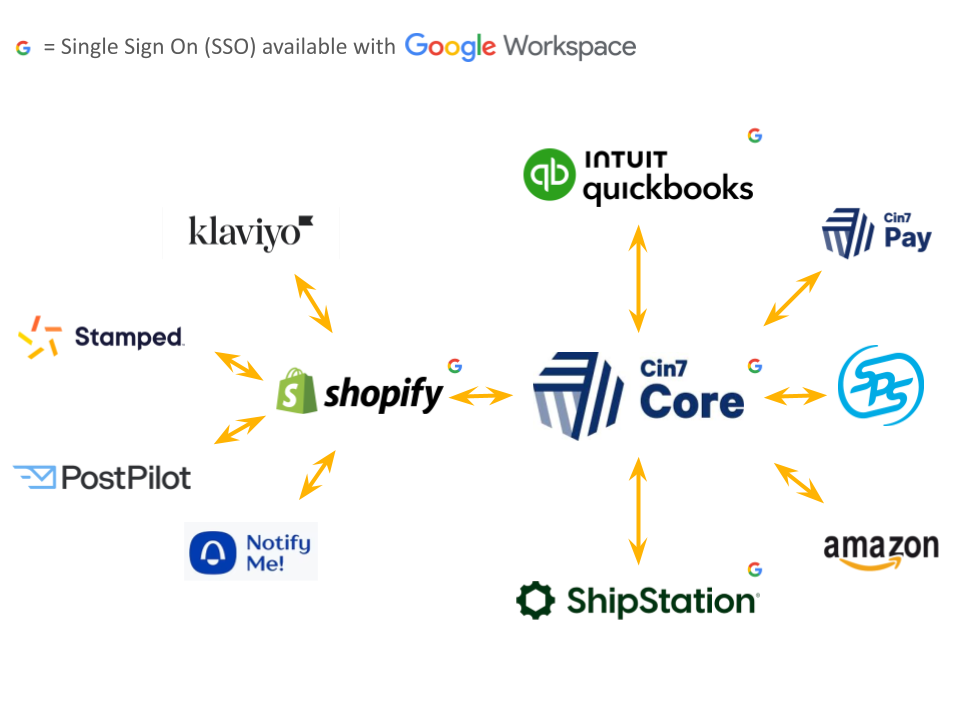
4. Cin7 Core (The Source of Truth)
In Stage 2, Cin7 Core becomes the cornerstone of your stack. It is an Inventory Management System (IMS) that manages procurement, manufacturing and tracks stock across every channel.
Integrations: It plugs directly into QBO, Shopify, Shipstation, and many other apps
Financial Reporting: When set up and used properly, it provides accurate financial reporting, especially around COGS (Cost of Goods Sold) and gross margins.
Cin7 Pay: A payment solution that allows you to collect payments from vendors directly.
Native Channels: It handles integrations with Amazon (FBA/FBM), Faire, Walmart and plenty other popular market places.
Implementation: Note that professional implementation takes time (usually 2–6 weeks). Read this article to find out more.
Estimated monthly cost: Starting at $349 to $1,000+ per month.
5. Shipstation (Logistics & Fulfillment)
As your order volume grows, you need an efficient solution to fulfill orders whether they come from Shopify or manual wholesale entries. Shipstation plugs into Cin7 and integrates easily with various carriers and provides competitive shipping pricing.
Estimated monthly cost: Starting at $9 to $230 per month.
6. Growth & Recovery: Advanced Shopify Apps
Now that Cin7 Core is managing your inventory, you can safely scale your marketing without the fear of overselling. We move to specialized apps to automate your growth:
Klaviyo (4.5/5 ⭐, 2,500+ reviews in Shopify app store): Once you have a customer base, you need the standard for advanced email and SMS marketing to drive repeat purchases. Cost: $0–$100+. Sign up for Klaviyo here
Postpilot (5/5 ⭐, 150+ reviews): Scale your reach offline. Use your data to send physical, automated postcards that cut through digital noise. Reaching offline is a demonstrated way to keep your customers coming back online. This app easily integrates with Shopify and provides great segmentation options. Cost: $0–$50+. Sign up for Postpilot here
Notify Me (4.9/5 ⭐, 3,000+ reviews): With Stage 2 inventory tracking, this app becomes a powerhouse, automatically alerting customers when products are back in stock so you never miss a recovery sale. Cost: $0–$20. Sign up for Notify Me here
7. SPS Commerce (EDI for Major Retail)
If you are entering major retailers (Target, Whole Foods, etc.), EDI (Electronic Data Interchange) is usually mandatory. SPS Commerce has a dedicated team specifically for Cin7 Core integrations. At Olari Consulting, we work directly with the team at SPS Commerce and coordinate this entire process between Cin7 and the EDI partner to ensure your retail orders flow without manual entry.
Estimated monthly cost: Starting at $100 to $500+ per month.
Implementation Recap: Estimated Monthly Costs
Essential Safety Add-ons
Norton Small Business
Security is fundamental to trust. We recommend Norton for all-in-one endpoint protection and secure VPNs to safeguard your operational integrity.
The Human Element of Scale
The best software only works if the implementation and maintenance are handled with precision.
Efficient Implementation: Setting up Cin7 Core and connecting it to your ecosystem is a complex task. Contact Olari Consulting for an efficient implementation and proper connection to all apps.
Expert Maintenance: While these tools automate data, your books still need to be maintained. Contact us to get access to bookkeepers who are already knowledgeable with Cin7 Core and its integration with QuickBooks Online. This is essential for accurate data reporting.
About Olari Consulting
At Olari Consulting, we help CPG founders "put everything together." We act as your on-demand ops team, ensuring your systems are built for scale so you can focus on your brand.
Ready to build your foundation?
Contact us today or email us at info@olariconsulting.com to get started.


